Overview
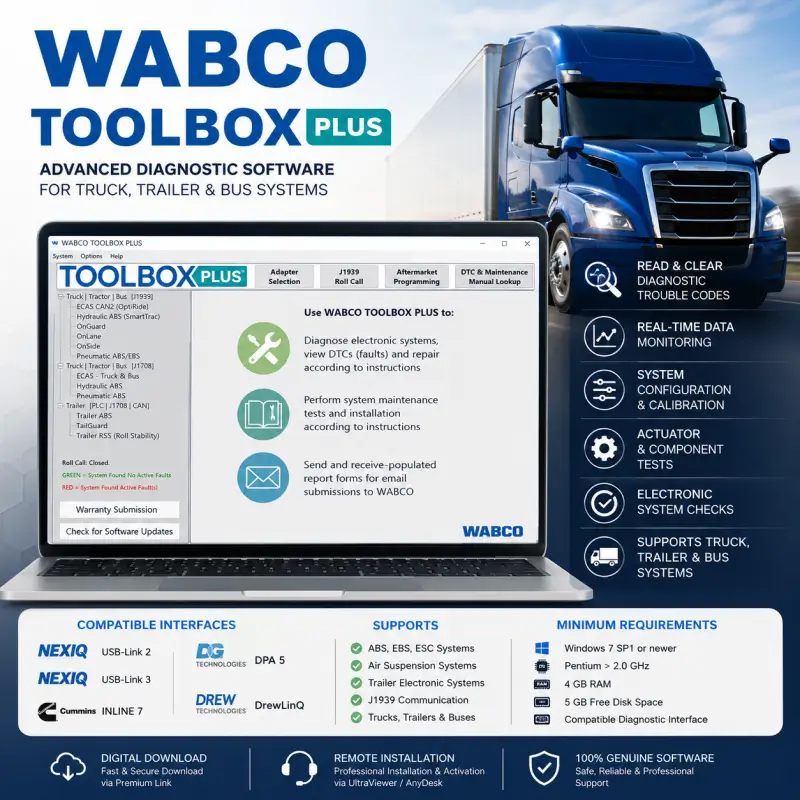
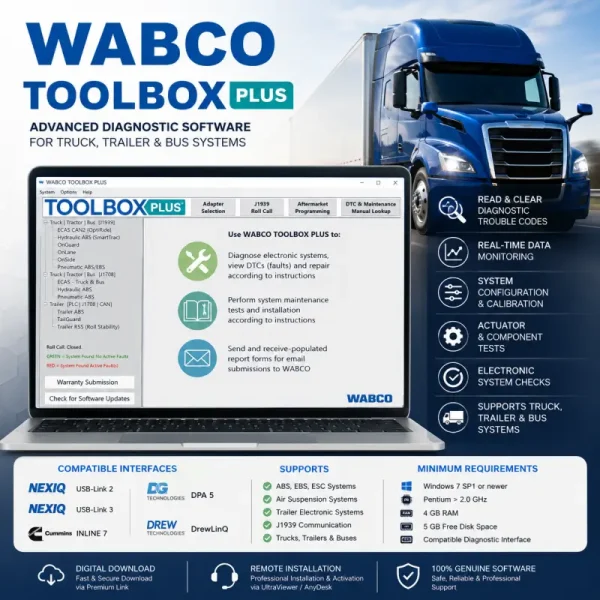
WABCO TOOLBOX PLUS 14.2.0 is advanced diagnostic software designed to troubleshoot, test, calibrate, and configure supported WABCO electronic control systems used in commercial trucks, trailers, and buses.
The software provides technicians with access to diagnostic trouble codes, real-time sensor data, system parameters, calibration procedures, actuator tests, solenoid activation, and electronic system checks.
Professional remote installation and activation are included, helping ensure that WABCO TOOLBOX PLUS is correctly installed and configured on your compatible Windows computer.
Key Features
- Read and clear WABCO diagnostic trouble codes
- Display real-time sensor and system data
- Monitor electronic braking and suspension parameters
- Configure supported system settings
- Perform system setup and calibration procedures
- Run actuator and component tests
- Activate supported solenoids
- Perform electronic system checks
- Access graphical diagnostic information
- Troubleshoot supported truck, trailer, and bus systems
- Communicate through compatible vehicle diagnostic interfaces
Available functions depend on the connected vehicle, WABCO control unit, system generation, communication interface, and installed equipment.
Supported WABCO Systems
WABCO TOOLBOX PLUS supports diagnostics and configuration for several commercial vehicle electronic systems, including:
- ABS – Anti-lock Braking System
- EBS – Electronic Braking System
- ESC – Electronic Stability Control
- Air suspension control systems
- Supported trailer electronic modules
- Supported truck electronic modules
- Commercial vehicle braking and stability systems
System availability may vary according to the vehicle, trailer, ECU generation, and regional configuration.
Software Information
| Software Information |
Details |
| Software Name |
WABCO TOOLBOX PLUS |
| Software Version |
14.2.0 |
| Diagnostic Standard |
J1939 |
| Vehicle Coverage |
Trucks, trailers, and buses |
| Activation |
Included |
| Remote Installation |
Included |
| Delivery Type |
Digital download |
Compatible Vehicle Communication Interfaces
| Manufacturer |
Compatible Interface |
| NEXIQ Technologies |
USB-Link 2 |
| NEXIQ Technologies |
USB-Link 3 |
| Cummins |
INLINE 7 |
| Dearborn Group Technologies |
DPA 5 |
| Drew Technologies |
DrewLinQ |
The appropriate interface drivers must be installed and correctly configured before connecting WABCO TOOLBOX PLUS to the vehicle or trailer.
Typical Users
WABCO TOOLBOX PLUS is suitable for:
- Fleet maintenance departments
- Truck and trailer repair workshops
- Commercial vehicle service centers
- OEM service facilities
- Independent commercial vehicle technicians
- Bus maintenance and repair workshops
- Trailer braking-system specialists
Minimum System Requirements
| Component |
Minimum Requirement |
| Computer |
Standalone laptop or desktop PC |
| Operating System |
Windows 7 SP1 or newer |
| Processor |
Pentium processor above 2.0 GHz |
| Memory |
4 GB RAM |
| Storage |
5 GB free disk space |
| Diagnostic Connection |
Compatible communication interface |
| Internet Connection |
Required for download and remote installation |
| User Access |
Windows administrator privileges recommended |
Delivery
For your convenience, the program will be professionally installed and activated remotely through an UltraViewer or AnyDesk session. Once your payment has been successfully completed, you will promptly receive an email containing the download link and detailed instructions. If you do not receive the email, please check your spam or junk folder. You may also contact us through the live chat by clicking the icon in the bottom-right corner of the screen. All our packages are securely hosted to ensure a fast, reliable, and convenient download experience. In the unlikely event that we are unable to complete the installation successfully, you will be entitled to a full refund as part of our commitment to customer satisfaction.


Daniel Carter –
Fantastic service. I was skeptical at first, but the remote installation was safe and efficient. It saved my workshop a lot of money.
Mark Wilson –
The technician was very knowledgeable. Everything was set up properly, although a short quick-start guide would have been useful.
Carlos Gomez –
Todo correcto y muy rápido.
Oliver Bennett –
Excellent service, very prompt communication and support.
Stefan König –
Top Qualität – passender Preis – kann nicht motzen 🙂
Luca Romano –
Prima!!!