Overview
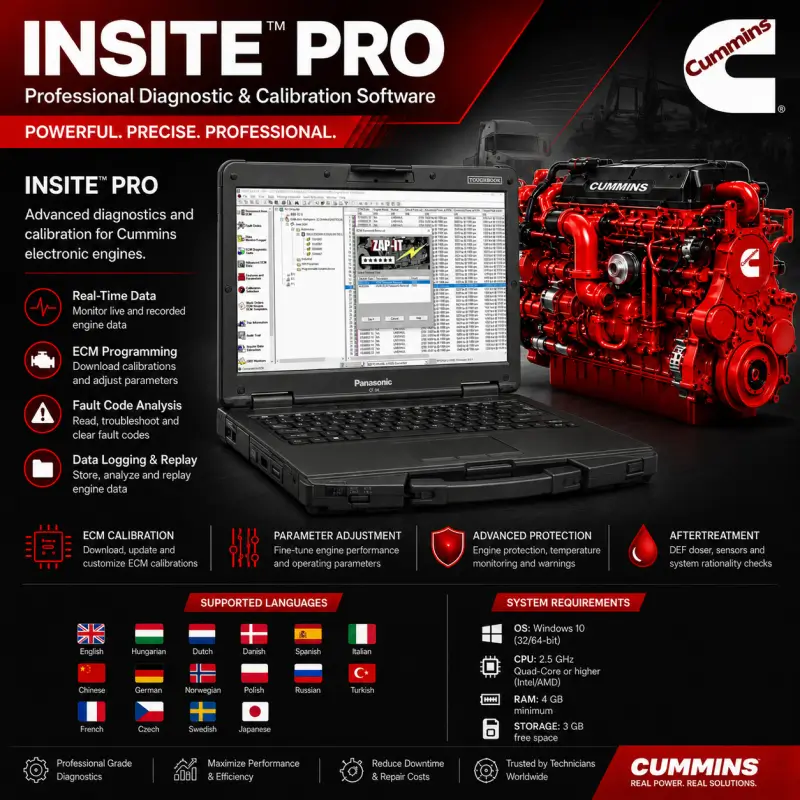
Cummins INSITE 8.9 PRO is a Windows-based diagnostic and calibration application designed for communication with compatible Cummins electronic control modules.
The software provides technicians with access to active and inactive fault codes, real-time engine parameters, recorded operating data, diagnostic tests, ECM information, calibration functions, and configurable control-module parameters.
INSITE can be used during engine troubleshooting, scheduled maintenance, controller replacement, calibration installation, parameter configuration, and post-repair verification.
Software Information
| Specification |
Details |
| Software |
Cummins INSITE |
| Version |
8.9 PRO |
| Application Type |
Engine diagnostics and ECM calibration |
| Supported System |
Windows 10 |
| Architecture |
32-bit and 64-bit |
| Primary Application |
Compatible Cummins electronic engines and ECMs |
Main Diagnostic Functions
Cummins INSITE 8.9 PRO provides the following diagnostic functions:
- Active fault-code retrieval
- Inactive fault-code retrieval
- Fault-code descriptions
- Diagnostic troubleshooting information
- Real-time engine-data monitoring
- Recorded engine-data retrieval
- Historical fault analysis
- Engine operating-data review
- Sensor-value monitoring
- ECM identification
- Trip and operational data
- Diagnostic test execution
- Engine-performance analysis
- Data logging
- Session recording
- Recorded-data replay
- Maintenance-history tracking
- Post-repair system verification
Available functions depend on the connected engine, ECM generation, calibration, communication adapter, and software configuration.
ECM Calibration and Programming Functions
The software provides access to compatible ECM calibration and programming operations, including:
- ECM calibration download
- Calibration installation
- ECM software updates
- Controller replacement support
- Calibration revision management
- ECM parameter adjustment
- Feature and parameter configuration
- Engine operating-parameter customization
- OEM parameter configuration
- Calibration transfer procedures
- ECM information verification
- Configuration restoration
- Parameter comparison
- Programmable feature review
The correct calibration must be selected according to the engine model, ECM code, application, emissions configuration, and equipment specification.
ECM Parameter Management
INSITE allows supported ECM parameters to be reviewed and adjusted according to the connected engine configuration.
Configurable parameters may include:
- Engine operating limits
- Vehicle speed settings
- Idle-control parameters
- Cruise-control settings
- PTO parameters
- Engine-protection settings
- Multiplexed switch assignments
- Transmission-related parameters
- OEM control settings
- Load-based control parameters
- Warning thresholds
- Feature enablement
- Sensor configuration
- Aftertreatment parameters
- Hybrid-system parameters
Parameter availability varies according to the ECM, calibration revision, engine family, and OEM application.
Advanced ECM Data
Cummins INSITE 8.9 PRO provides access to additional engine-protection, temperature, warning, and control parameters where supported by the ECM.
Advanced data may include:
- Main-bearing engine-protection information
- Intake-manifold protection parameters
- ECM internal-temperature monitoring
- Low coolant-level warning information
- High-temperature warning parameters
- OEM load-based control settings
- DCDC low-voltage output monitoring
- Aftertreatment sensor data
- Multiplexed switch status
- Hybrid-system protection parameters
- Engine operating-limit information
The displayed parameters depend on the ECM calibration and the features enabled by the original equipment manufacturer.
Supported Engine and Equipment Coverage
The included coverage information is displayed through the existing product table:
Cummins INSITE may be used with supported Cummins engines installed in applications such as:
- On-highway vehicles
- Medium-duty trucks
- Heavy-duty trucks
- Buses
- Construction equipment
- Agricultural equipment
- Industrial machinery
- Mining equipment
- Generator sets
- Power-generation systems
- Marine applications
- Stationary engines
- Off-highway equipment
Exact support must be confirmed using the engine serial number, ECM code, engine family, calibration revision, and equipment application.
Recorded Data and Maintenance History
INSITE provides data storage and replay functions that allow diagnostic sessions and engine information to be reviewed after communication with the ECM.
Recorded information may include:
- Fault-code history
- Engine operating parameters
- Sensor readings
- Trip information
- ECM configuration data
- Diagnostic test results
- Before-and-after repair data
- Calibration information
- Parameter changes
- Technician session records
These functions support fault analysis, maintenance documentation, technical reporting, and comparison of engine behavior before and after repairs.
Supported Languages
| Language |
Language |
| English |
Hungarian |
| Dutch |
Danish |
| Spanish |
Italian |
| Chinese |
German |
| Norwegian |
Polish |
| Russian |
Turkish |
| French |
Czech |
| Swedish |
Japanese |
Language availability may vary between the software interface, diagnostic descriptions, troubleshooting content, and individual engine applications.
System Requirements
| Component |
Minimum Requirement |
| Operating System |
Windows 10, 32-bit or 64-bit |
| Processor |
Intel or AMD quad-core processor at 2.5 GHz or higher |
| Memory |
4 GB RAM minimum |
| Storage |
3 GB of available disk space |
| Display |
Windows-compatible display |
| User Access |
Administrator privileges recommended for installation |
| Communication Hardware |
Compatible Cummins diagnostic adapter required for ECM communication |
Additional storage may be required for calibration files, diagnostic logs, recorded sessions, software updates, and supporting data.
Communication Requirements
A compatible communication adapter and the correct engine diagnostic cable are required to establish communication between the computer and the Cummins ECM.
Successful connection depends on:
- Communication adapter compatibility
- Correct adapter drivers
- Engine diagnostic connector
- Vehicle or equipment voltage
- ECM communication protocol
- Windows configuration
- INSITE adapter settings
- Correct ignition or key-switch state
The diagnostic adapter is not included unless it is specifically listed as part of the selected package.
Delivery
For your convenience, the program will be professionally installed and activated remotely through an UltraViewer or AnyDesk session. Once your payment has been successfully completed, you will promptly receive an email containing the download link and detailed instructions. If you do not receive the email, please check your spam or junk folder. You may also contact us through the live chat by clicking the icon in the bottom-right corner of the screen. All our packages are securely hosted to ensure a fast, reliable, and convenient download experience. In the unlikely event that we are unable to complete the installation successfully, you will be entitled to a full refund as part of our commitment to customer satisfaction.





Thomas Green –
Second time buying from them and the service has been excellent both times. Wouldn’t hesitate to come back again.
George Wilson –
Everything works perfectly and the price was fair. I’d definitely recommend it.
Robert Turner –
The remote support was amazing, had everything sorted out in no time.
Andreas Weber –
Professionelle Unterstützung, vielen Dank.
Mark Wilson –
Installation went smoothly and everything matched the description.
James Evans –
Can definitely recommend them. The remote installation service was very professional.
David Miller –
Excellent service once again, I’d happily use them in the future.
Sophie Laurent –
Great communication and very friendly throughout. I’m really happy with everything, thank you so much! 🤗👌🏻
Stefan König –
Top Service 😉
Hans Keller –
Korrekter Verkäufer, alles bestens.
Nathan Brooks –
Thanks for the software, everything worked fine. A+++++
Kevin Smith –
Installed without any issues and worked perfectly. Definitely recommend.
Oliver Grant –
Very helpful people and they paid attention to every detail. I’m happy with the service provided.
Daniel Brooks –
I was a bit unsure at first, but the service exceeded my expectations. Honestly better than the support I’ve had from some OEMs.
Michael Brown –
These guys really know what they’re doing. Thanks again for all the support.