Overview
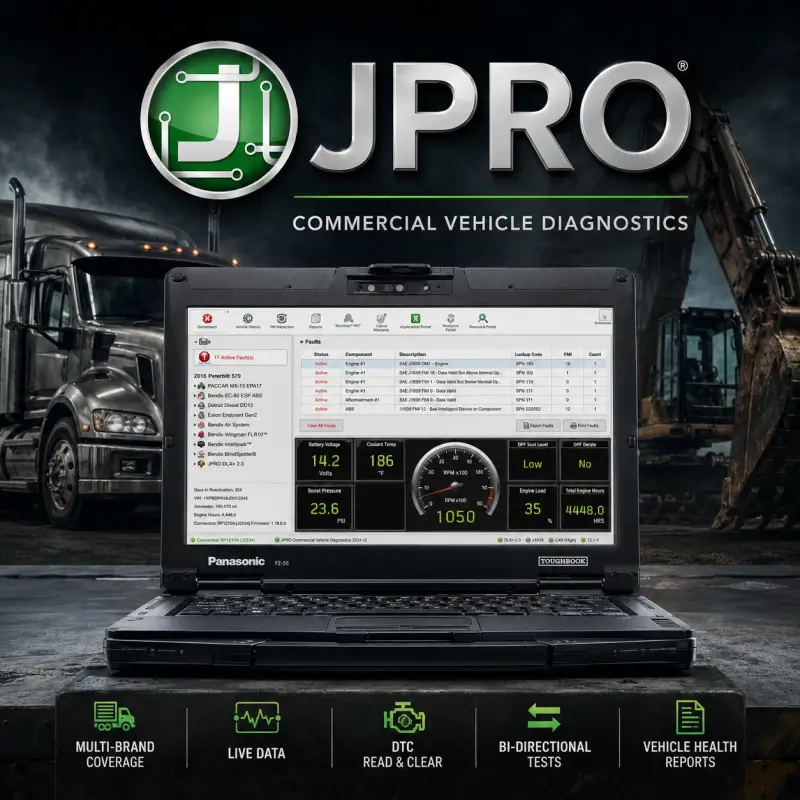
JPRO 2026 v1 is a professional multi-brand diagnostic application developed for heavy-duty trucks, medium-duty commercial vehicles, and supported commercial vans.
The software provides a unified diagnostic environment for communicating with compatible engine, transmission, ABS, aftertreatment, and vehicle electronic control systems. It allows technicians to retrieve diagnostic trouble codes, monitor live data, perform supported bi-directional tests, and generate vehicle health reports from a single application.
JPRO is suitable for commercial vehicle repair workshops, fleet maintenance departments, mobile technicians, and service facilities working with multiple truck manufacturers.
JPRO Software Information
| Specification |
Details |
| Software |
JPRO Professional |
| Version |
2026 v1 |
| Activation |
Included |
| Supported Languages |
English and Spanish |
| Vehicle Categories |
Heavy-duty trucks, medium-duty trucks, and commercial vans |
| Operating Systems |
Windows 10 and Windows 11 |
| Diagnostic Hardware |
Compatible Noregon, Nexiq, or similar adapter required |
| Installation |
Remote installation and configuration available |
Main Diagnostic Functions
JPRO 2026 v1 provides diagnostic access to compatible vehicle systems and electronic control modules.
Supported functions may include:
- Active diagnostic trouble-code retrieval
- Inactive diagnostic trouble-code retrieval
- Diagnostic trouble-code clearing
- Fault-code descriptions
- Real-time data monitoring
- Recorded parameter analysis
- Engine-system diagnostics
- Transmission-system diagnostics
- ABS and braking-system diagnostics
- Aftertreatment-system diagnostics
- Component and actuator testing
- Bi-directional control functions
- DPF regeneration procedures
- Cylinder cut-out testing
- Forced system resets
- Sensor and switch monitoring
- Vehicle identification
- Control-module identification
- Post-repair diagnostic verification
- Vehicle health reporting
Function availability depends on the vehicle manufacturer, model, model year, installed electronic systems, and diagnostic adapter.
Live Data Monitoring
JPRO displays real-time parameters transmitted by supported vehicle control modules.
Available live data may include:
- Engine speed
- Vehicle speed
- Coolant temperature
- Engine oil pressure
- Fuel pressure
- Battery voltage
- Boost pressure
- Fuel-consumption information
- Emissions data
- Exhaust temperatures
- DPF soot information
- Aftertreatment status
- DEF system parameters
- Transmission data
- ABS information
- Sensor readings
- Switch states
- Electronic control-module status
The displayed parameters vary according to the connected vehicle and control system.
Advanced and Bi-Directional Tests
JPRO supports advanced service tests and control commands on compatible systems.
Available procedures may include:
- Parked DPF regeneration
- Forced DPF regeneration
- Cylinder cut-out testing
- Injector-related testing
- Component activation
- Actuator commands
- Fan activation
- Engine-system tests
- Transmission-system tests
- ABS-system tests
- Aftertreatment-system tests
- DEF-system checks
- Sensor verification
- Forced resets
- Service reset procedures
Not every function is available for every vehicle. Test availability depends on the manufacturer, ECU type, control-module software, and vehicle configuration.
Vehicle Health Reports
JPRO can generate diagnostic reports containing information collected during a vehicle connection session.
Reports may contain:
- Vehicle identification
- VIN information
- Engine information
- Detected control modules
- Active fault codes
- Inactive fault codes
- Fault-code descriptions
- System status information
- Selected live parameters
- Vehicle health summary
- Diagnostic-session details
- Technician notes
These reports can be used for preventive maintenance, repair documentation, fleet records, and before-and-after repair comparisons.
Full JPRO Vehicle Coverage
| Manufacturer |
Supported Models |
| Freightliner |
Cascadia, Columbia, Coronado, M2, FL-Series |
| Volvo |
VNL, VNM, VNR, VAH, VHD |
| Mack |
Anthem, Granite, Pinnacle, LR, TerraPro |
| Kenworth |
T680, T880, W900, T800, T370 |
| Peterbilt |
579, 389, 567, 520, 365 |
| International |
LT, RH, LoneStar, ProStar, Durastar, WorkStar |
| Western Star |
4700, 4900, 5700XE, 6900 |
| Sterling |
Acterra, A-Line, L-Line |
| Ford |
F-650, F-750, F-Series Super Duty |
| Chevrolet |
Kodiak, Silverado 4500HD, Silverado 5500HD, Silverado 6500HD |
| GMC |
TopKick, Sierra 4500HD, Sierra 5500HD, Sierra 6500HD |
| Isuzu |
N-Series, F-Series |
| Hino |
Hino 155, Hino 195, Hino 238, Hino 258, Hino 338 |
| Ram / Dodge |
Ram 4500, Ram 5500 |
| Mercedes-Benz |
Sprinter |
| Freightliner Vans |
Sprinter |
| Dodge Vans |
Sprinter |
Exact diagnostic coverage depends on the vehicle year, installed engine, transmission, ABS system, electronic architecture, and supported control modules.
Supported Vehicle Systems
JPRO may communicate with compatible:
- Engine control modules
- Transmission control modules
- ABS control modules
- Brake-system controllers
- Aftertreatment controllers
- Instrument clusters
- Body controllers
- Chassis control modules
- Emissions systems
- DEF systems
- Vehicle network modules
- Manufacturer-specific electronic systems
System coverage varies by manufacturer and vehicle configuration.
Supported Languages
Language availability may vary between the software interface, diagnostic descriptions, and manufacturer-specific information.
Diagnostic Adapter Compatibility
JPRO requires a compatible commercial vehicle communication adapter.
| Diagnostic Adapter |
Compatibility |
| Noregon DLA+ 2.0 |
Supported |
| Nexiq USB Link |
Supported |
| Nexiq USB Link 2 |
Supported |
| Similar Compatible Adapters |
Compatibility depends on drivers and supported protocols |
Successful communication depends on:
- Correct adapter drivers
- Compatible adapter firmware
- Stable USB connection
- Vehicle diagnostic connector
- Supported communication protocol
- Correct ignition state
- Stable vehicle battery voltage
- Windows adapter configuration
A diagnostic adapter is not included unless explicitly stated in the selected package.
System Requirements
| Component |
Requirement |
| Operating System |
Windows 10 or Windows 11 |
| Processor |
Modern Intel or AMD processor |
| Memory |
4 GB RAM minimum; 8 GB recommended |
| Storage |
Sufficient free space for software, reports, and diagnostic logs |
| USB Port |
Required for most communication adapters |
| Diagnostic Adapter |
Noregon DLA+ 2.0, Nexiq USB Link, or compatible interface |
| User Access |
Windows administrator access required for installation |
An SSD and at least 8 GB RAM are recommended for improved loading speed and diagnostic-session performance.
Remote Installation and Configuration
JPRO 2026 v1 can be professionally installed, activated, and configured remotely.
The service may include:
- JPRO software installation
- Activation configuration
- Required Windows runtime installation
- Diagnostic-adapter driver installation
- Adapter configuration
- Software launch testing
- Adapter detection testing
- Basic connection preparation
A stable internet connection and Windows administrator access are required during the remote installation session.
Vehicle communication testing requires a compatible diagnostic adapter and access to a supported commercial vehicle.
Important Diagnostic Information
Before performing a diagnostic test, forced regeneration, cylinder test, or system reset:
- Confirm the correct vehicle identification
- Record active and inactive fault codes
- Review relevant live data
- Maintain stable vehicle battery voltage
- Use a compatible diagnostic adapter
- Follow the vehicle manufacturer’s service procedures
- Keep the work area adequately ventilated
- Keep personnel away from moving components
- Verify system operation after completing the procedure
JPRO provides extensive multi-brand diagnostic coverage. However, certain manufacturer-specific ECU programming, module flashing, security access, or advanced configuration procedures may require separate OEM applications.
Delivery
Upon successful payment, you will promptly receive an email containing your download link. If the email does not arrive, please check your spam or junk folder. You may also contact us through the live chat by clicking the icon in the bottom-right corner of the screen. Our packages are securely hosted to provide a fast, reliable, and convenient download experience. Should you encounter any difficulties during the download process, our support team will be ready to assist you. When selecting the Remote Installation option during checkout, our team will handle the complete installation and configuration process remotely through an UltraViewer or AnyDesk session, ensuring a smooth and convenient setup.



Michael Keller –
Top-notch JPRO installation service. Can only recommend it. Thanks and greetings.
Stefan Bauer –
Top Qualität, passender Preis, kann nicht motzen.
David Miller –
One of the best buying experiences I’ve had. Will definitely buy again in the future.
Andreas Weber –
Super geklappt, besten Dank.